How to register with MiCasino Venezuela and prepare your first deposit
Creating an account may be quick; correcting a name, currency or incorrectly recorded payment later is much less convenient. Before registering with MiCasino.com from Venezuela, prepare your details and decide how you will deposit and withdraw. You will complete the form with an account you can use and verify.
Free registration does not oblige you to deposit immediately. Use that moment to check the cashier, terms and documents. Clarify currency options or promotions before sending money.
Prepare the details you will actually use
Use accessible email, your own phone and identification. Avoid temporary addresses or borrowed numbers: you may need them for recovery or reviews. Also check you meet the platform’s adult-age requirement.
Your username may be an alias. Your profile’s legal name must instead match documents and payment methods. These are different fields; do not put your username nickname in the surname space.
Email: check every character and confirm messages arrive.
Password: create a unique one and save it in a manager if you use one.
Identification: prepare details exactly as shown on the document.
Payment method: use an account or wallet identifiable as yours.
Budget: decide the amount before viewing the bonus.
Complete MiCasino registration step by step
The official tutorial describes an initial form with username, email, password, currency and a promotional field, followed by personal details. Computer and phone layouts may differ, but the goal remains one account with coherent information.
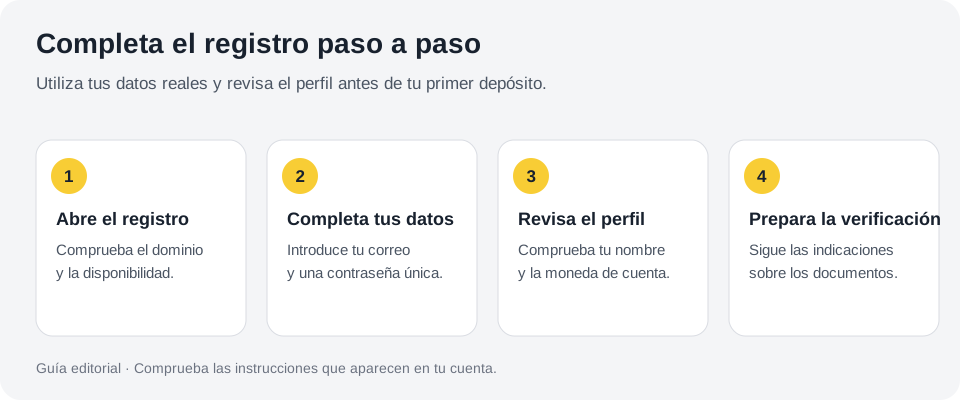
Editorial illustration: check the domain, complete details and prepare verification.
Go to MiCasino.com and find Register. Check the full address before entering details.
Enter username, email and password. If the alias exists, choose another; do not change personal details to fix it.
Check country and currency. Select real options offered for your situation.
Add a code only if you know its offer. Read what it activates and when to enter it.
Complete your profile. Enter name, surnames, identification, phone and birth date in current fields.
Read and accept the terms. Also review separately manageable marketing preferences.
Check the created account. Respond to requested confirmations before using the cashier.
If identification requires a prefix, use the one matching your document and the on-screen example. Do not intuitively add spaces, hyphens or characters. Small discrepancies may cause later checks.
VES or USD: decide how to hold your balance
The account currency, your bank currency and the payment currency may differ. If you plan to deposit bolívares through a local method, check which wallet you will use. If you intend to send cryptocurrency, first check the configuration and processor enabled by the cashier.
The official Venezuela crypto guide of October 2023 describes a wallet in USD and the processor CoinsPaid. This historical route does not guarantee free currency changes or retention of all promotions today. Confirm current options before depositing.
Do not open a second account to test another currency. Ask support to correct a wrong choice and explain balance effects. Clarifying before the first deposit is easier.
USD and USDT are not the same detail. USD may denominate your casino balance; USDT is a digital asset transferable on different networks. The cashier must show how it receives and credits the transaction.
Check profile before linking payments
Open the dashboard and check completed fields. Correct errors while still easy to describe. If a field is locked, request changes through Help; do not replace profile identity.
Then check My Payment Details or the equivalent section. The bank account holder must correspond to your account. If you use a wallet, keep records that may help prove your use of it when the operator requests them.
Do not yet register a crypto address copied from a tutorial. Choose real asset and network first. Visual examples show field location, not valid transfer instructions.
Upload identification without cropping or glare
MiCasino’s document guide says to use both sides of identification, keep details legible and show the edges. It also says driving licences are not accepted for VES. Check Documents for the formats and requirements applying to your account.
Place the document flat and find glare-free lighting. Check photos before upload: numbers and details must be readable without blur or cuts. Do not alter information in the image.
Read any additional verification request precisely. Do not scatter a file collection across every channel. Follow the official procedure and save receipt messages or dashboard status.
If your document is rejected
Find the specific reason. If the photo is blurry, retake it; if information does not match, check the profile; if the document is unsuitable for that verification, ask for an accepted alternative. Uploading the same file again without fixing anything rarely changes the outcome.
For damaged ID or particular document circumstances, speak to support before depositing. Do not assume a substitute accepted elsewhere will be accepted here.
Decide on the bonus before your first deposit
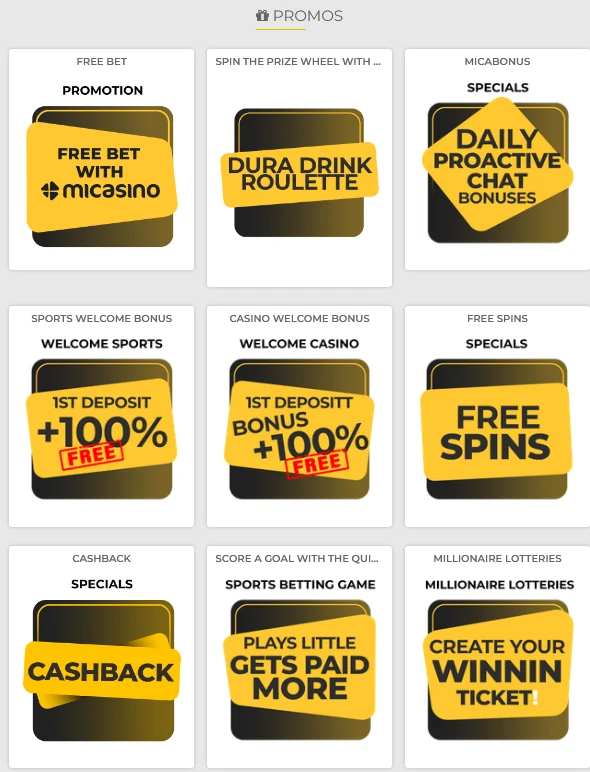
Open the promotion and check whether it requires registration code, selection in Bonuses or chat. These are different routes. Some code campaigns require deposit and request on the same day.
Promotions section to review before your first deposit. The interface may vary with your account.
Calculate the requirement before accepting. For live betting or tables, make sure the activity is included. Examples are in the Venezuela bonus guide.
Do not deposit again just because the welcome bonus failed to appear. Ask support about deposit and promotion. Repeating may not solve eligibility and increases committed funds.
First bolívar deposit: follow your cashier instructions
Public Venezuela instructions document Pago Móvil and transfers. For both, open Deposit and obtain current details; do not pay accounts kept from old screenshots.
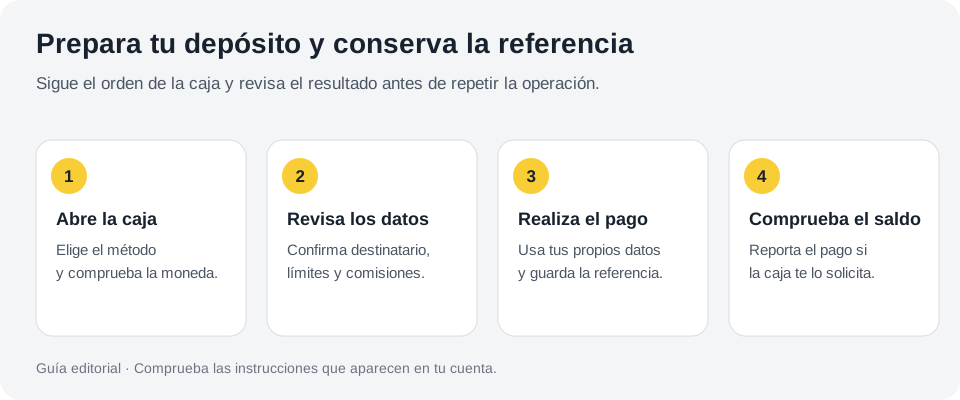
Editorial illustration: check cashier details and keep receipt.
Select method and currency. Check minimum, maximum and displayed costs.
Get recipient details. Check bank, identification and method-specific fields.
Make the transaction from your account. Confirm amount before authorising.
Report payment if requested. Copy exact amount, full reference and date without rounding.
Check history. Wait for deposit confirmation before repeating.
If your bank confirmed sending and MiCasino still does not show funds, keep the receipt. Identify whether payment reporting remains incomplete or the transaction is under review. Do not confuse a completed bank transfer with its final crediting to the casino.
First crypto deposit: verify four details before sending
Use only if your cashier enables it. Having Binance or a wallet is insufficient: MiCasino must show a compatible method and asset-specific receiving instructions.
Pre-transfer crypto checks
Detail
What to compare
Error prevented
Asset
Currency name at origin and destination.
Sending another token to an incompatible address.
Network
The selected network on both platforms.
Confusing different USDT routes, for example.
Address
The full address generated for the transaction.
Using an old address or one altered during copying.
Net amount
What arrives after sending costs.
Falling below the required minimum.
If a memo, tag or extra identifier appears, follow cashier instructions. Respect request validity too. Do not make a supposed “test” below minimum: small amounts may not be credited.
After sending, save hash or transaction identifier and network. They locate delayed transactions. Never share recovery phrases or private keys.
Log in and check your balance makes sense
Return to the dashboard and distinguish deposit from bonus. Check currency and credited amount before opening a game. If conversion occurred, compare with what you accepted.
Then check active promotion status and pending requirements. Do not infer everything visible is withdrawable. The withdrawals explains separation of funds, documents and transaction review.
On your phone, use the browser directly and save a shortcut if convenient. The MiCasino mobile explains how without relying on APKs found through search.
Resolve common errors without another account
Registration and first-deposit issues
Problem
First step
What to avoid
Email already exists
Check for an existing account and recover access.
Another profile with changed details.
A message does not arrive
Check address, spam and mail filters.
Continuously requesting codes without waiting.
Country or method missing
Check availability with support.
Giving a country other than your actual one.
Identity does not match
Request a documented correction to your profile.
Editing the document photo.
Pending deposit
Check your history and keep the reference.
Paying again for the same request.
The bonus does not appear
Check activation and eligibility using the deposit number.
Betting on the assumption that it will count retroactively.
Prepare your account for your next login
Store your password securely and review the protection options offered by the dashboard. Do not leave a session open on a shared phone. If you use additional verification, keep its recovery methods out of other people’s reach.
Before finishing, set the amount and time you will devote to your first session. You can complete registration and close the page without playing. Having an account ready does not oblige you to use it that same day.
These are some reviews posted by MiCasino users on Trustpilot. Experiences may vary by player, payment method and account terms.
★
Player reviews on TrustpilotReal experiences shared by users
M
Maria Meyona27 May 2026
CHILE
★★★★★5 out of 5
The website is easy to understand and fair too. Personally, I have been very lucky and have won over $1,000.
✓Published on Trustpilot
R
Rocio Gomez3 June 2026
CHILE
★★★★★5 out of 5
Micasino is my favourite
Micasino always surprises me with how quickly they pay. Last time I won €160 and had the money in under 15 minutes. Plus, every time I deposit they give me free spins, which I love.
✓Published on Trustpilot
F
Fabiana Villafuerte9 May 2026
CHILE
★★★★★5 out of 5
Excellent platform
I love slot games; I have won and withdrawn my winnings. What I like most is the variety of sections for every taste, including sports betting.
✓Published on Trustpilot
C
Jose RodriguezVideo experience
CHILE
★★★★★5 out of 5
Watch a MiCasino player’s experience in this short video.
✓Published on Trustpilot
Frequently asked questions about registration
The registration described by MiCasino is free. A deposit or a payment method fee is a separate transaction.
You can complete registration and review the options before depositing. Complete any checks requested by the platform in order to continue.
Use your own payment methods and details that match your identity. If you have a special situation, ask about it before sending money.
The operator’s historical guide describes that configuration. Check which wallet and processor your account currently offers before changing currency or sending an asset.
Ask support which options your account allows and what happens to your balance and promotions. Do not open another profile to resolve it.
Do not assume so. The operator may request identification under its terms and depending on the transaction; review the requirements before depositing.
Keep the receipt and ask support about the promotion before betting or depositing again. Request confirmation of activation.
How we prepared this guide
Editorial team. We bring together public documentation from MiCasino, its help centre, providers and the CGA register to explain how to prepare an account from Venezuela. Last reviewed: 25 September 2026.
Distinguish calculation examples from current terms. We do not present Venezuelan account transactions as tests we performed. Consult our methodology to understand the review’s scope and limitations.

 EN
EN Español
 Português
 Français